

Search Website
Grading with Rubrics

Using thoughtfully designed rubrics in teaching and learning can achieve the following:
For Students:
- clarify instructor expectations
- give them a goal and success criteria to work towards in producing their work
- identify all components of the work
- provide clarity on how they can improve in future
- help them understand why they achieved a specific grade
For Instructors:
- minimize miscommunication regarding assignment expectations
- lead to better and more focused work from the students
- provide clarity for Graduate Teaching Assistants who are grading / providing student support and feedback
- support more consistent grading between assignments
- support more consistent grading across teams of Graduate Teaching Assistants
- save time in grading
- allow the instructor to spend more time on substantive comments
- result in fewer meetings with students to explain the grade they received
Meanwhile, rubrics can also present several potential , including student variability in rubric needs and preferences, vague or complex criteria that leads to misunderstandings, limiting creativity if criteria are too rigidly defined, and the front-end work of developing a strong rubric. The tips in the resource are designed to mitigate these challenges, supporting instructors, teaching assistants, and students alike.
Designing Rubrics
When designing rubrics for course assessments, consider involving undergraduate students and Graduate Teaching Assistants in the process. A Students-as-Partners approach helps incorporate diverse perspectives and actionable feedback, while also supporting stronger relationships and more collaborative learning environments. Graduate students can learn more about teaching strategies and assessments by attending our Graduate Student Programming
Analytic Rubrics
Analytic rubrics offer detailed grading and feedback criteria, breaking down levels of performance by detailed, individual criteria tied to assessment outcomes over 3 –5 levels of performance.
As a result, analytic rubrics offer numerous benefits:
- The opportunity for clear, specific student feedback
- Support consistency in grading for instructors and teaching assistants
- Support clear student understanding of expectations across the grading of the assignment
However, because of the amount of detailed criteria that go into analytic rubrics, there are also a few potential limitations:
- More design intensive
- May take longer to use (than a holistic rubric)
- Students may not spend as much time carefully reviewing lengthy criteria
- May limit student creativity if they are overly focused on meeting criteria in specific or structured ways (i.e. number of sources included vs. quality of research)
Holistic Rubrics
In contrast to analytic rubrics, which offer students a high level of detail, holistic rubrics offer a more streamlined way to provide criteria and feedback to students by focusing on categories of criteria over 3 – 5 levels of performance.
The primary benefits of holistic rubrics can include the following:
- Relatively quick to design and use
- Students can see high-level criteria at a glance
- Welcomes more creative play from students (as compared to a more specific / structured analytic rubric)
- Support streamlined grading for larger classes
Meanwhile, adopting holistic rubrics may create the following limitations:
- Do not provide detailed criteria for students who need or prefer it
- Rely on limited or high-level (rather than detailed) feedback
Single-Point Rubrics
Lastly, single-point rubrics combine the holistic rubric (short, point-based grading levels) with the analytic rubric (separated, specific criteria) alongside short, targeted feedback for each criteria type.
The primary benefits of a single point rubric include:
- Simpler creation compared to analytic rubric while still offering individual criteria
- Streamlines grading to specific criteria
- Offers open space for additional comments
Single-point rubrics also face the following limitations:
- Requires more written feedback comments
- Provides less clarity on criteria expectations to students
Rubric Design Principles
Before beginning to draft a rubric, it may be helpful to determine the following:
- Purpose
What are you assessing? Why? What do you want students to know? - Type of rubric
What is the context? (e.g., class size, student, TA, and instructor needs) - Criteria
What are the categories on which students will be assessed based on the course learning outcomes? - Levels of performance
- How many levels of performance is appropriate for the breadth and depth of this assignment?
- Criteria descriptors
- What needs to be communicated to students to clarify expectations on grading criteria?
- Feedback
- What role can criteria descriptors play in providing feedback (if any) and what level of additional feedback will be required
Generally, rubrics should
- Align with learning outcomes
- Avoid “construct irrelevant” criteria (i.e., criteria that are not aligned with learning outcomes)
- Use clear, descriptive, and specific language
Criteria should use student-centered language and be described across performance levels with clear differentiation, varied complexity, and parallel structure - Be shared with students as early as possible
Provide rubrics alongside assignment instructions, discuss with students and answer any questions they may have; you could also invite feedback on the rubric or consider co-developing the rubric with students - Align with and adapt to disciplinary, student, and instructor contexts
- Consider factors such as class size, available teaching assistants, level of course
- Balance specificity with flexibility / creativity
Identify criteria that are important and non-negotiable, as well as places where there is room for student interpretation and creativity. Consider building in creative options, flexibility, or choice into the assignment (e.g., different modes of communication)
Scholarship of Teaching and Learning (SoTL) on rubrics and student performance:
"In Panadero and Jönsson (2013), rubrics were found to mediate improved student performance by, for instance, reducing anxiety. These effects too are contingent on the transparency provided by the rubrics. For instance, when asked about anxiety, pre-service teachers spoke about increased confidence and making it easier to hand in assignments when having access to a rubric (Andrade & Du, 2005)."
Jönsson and Panadero. (2017). The use and design of rubrics to support assessment for learning. Scaling Up Assessment for Learning in Higher Education. Eds. David Carless et al. Springer.
Rubric Examples
|
|
Level 4 |
Level 3 |
Level 2 |
Level 1 |
|
Content Knowledge
/4 |
Response demonstrates a high degree of understanding of the context of the case and the unique challenges present |
Response demonstrates an understanding of the context of the case and some of the unique challenges present
|
Response demonstrates some limited understanding of the context of the case and minimal context of the unique challenges present
|
Response demonstrates minimal understanding of the context of the case and almost none of the unique challenges present |
|
Analysis
/4 |
Response exhibits detailed reflection on the various considerations relevant to the case, expertly justifying decisions and approaches |
Response exhibits reflection on the various considerations relevant to the case, justifying decisions and approaches
|
Response exhibits some reflection on the various considerations relevant to the case, with minimal justification of decisions and approaches |
Response exhibits limited reflection on the various considerations relevant to the case, with almost no justification of decisions and approaches
|
|
Research
/4 |
Response thoughtfully engages numerous appropriate and high-quality external resources (course material, other external research) to increase validity and reliability of the response |
Response engages some appropriate external resources (course material, other external research) to increase validity and reliability of the response
|
Response engages limited external resources (course material, other external research) with minimal effectiveness on increasing validity and reliability
|
Response does not engage external resources and/or engages inappropriate or inaccurate material limiting the validity and reliability of the response
|
|
Recommendations /4 |
Response offers expert recommendations, with clear justification for choices made, and strong consideration given to both strengths and weaknesses, as well as other alternative solutions |
Response offers recommendations, with justification for choices made, and good consideration given to both strengths and weaknesses, as well as other alternative solutions
|
Response offers recommendations, with limited justification for choices made, and minimal consideration given to both strengths and weaknesses. Consideration of alternative solutions is minimal |
Response offers poor or unreasonable recommendations, without justification for choices made, and no consideration given to strengths, weaknesses, or alternative solutions |
|
Communication and Formatting
/4 |
Response is clear and easy to follow, with appropriate formatting (headings, bullet points etc. where applicable). Material is summarized well, with appropriate elaboration in relevant sections. Final submission is polished, and would definitely impress a potential client |
Response is clear and easy to follow, with appropriate formatting (headings, bullet points etc. where applicable). Material is summarized well, with appropriate elaboration in relevant sections. Final submission is polished, and would leave a positive impression on a potential client
|
Response is sometimes clear and easy to follow, with some use of formatting (headings, bullet points etc. where applicable). Material is elaborated on in relevant sections. Final submission has errors that would be unlikely to leave a positive impression on a potential client
|
Response is unclear and hard to follow. Material is not summarized and delivered in a difficult to read format. Final submission is sloppy and would surely disappoint a potential client
|
Table 1: Sample Analytic Rubric for Case Study Response
|
Point(s) |
Criteria |
|
3 |
Presents a clear, concise, and persuasive argument that integrates scholarly and public sources effectively. Essay structure supports audience engagement, and writing style and mechanics are sophisticated and purposeful. |
|
2 |
Presents a generally clear, concise, and persuasive argument with overall effective integration of scholarly or public sources. Essay structure does not impede audience engagement, and writing style and mechanics are generally appropriate for the audience and level of work.
|
|
1 |
Presents a unclear or underdeveloped argument and occasionally includes scholarly or public sources that are not clearly integrated. Essay structure is disjointed or unclear, and writing style and mechanics impede clarity and flow.
|
|
0 |
Not submitted OR significantly incomplete with minimal or no analysis, insufficient or inappropriate sources, and confusing or unclear structure, style, and mechanics.
|
|
Comments
|
|
Table 2. Sample Holistic Rubric for an Essay Assignment.
|
Criteria |
1 |
2 |
3 |
4 |
Feedback |
|
Learning Materials |
|
|
|
|
|
|
Delivery & Persuasion |
|
|
|
|
|
|
Audience engagement |
|
|
|
|
|
|
Responsiveness & Professionalism |
|
|
|
|
|
|
Creativity & Originality |
|
|
|
|
|
Table 3. Sample Single-Point Rubric for a Group Presentation.
Building Rubrics in OWL Brightspace
OWL Brightspace integrates a rubric tool which allows you to easily create rubrics and grade student work directly on the platform and link it to your gradebook. We have created an instruction guide on how to build rubrics below:
-
Create a Rubric
A. Navigate banner menu in your course to the drop-down menu labelled “Assessments”
B. Click “Assessments” and navigate to "Rubrics”

C. Select button labelled “New Rubric”

D. Select your rubric type (analytic or holistic)
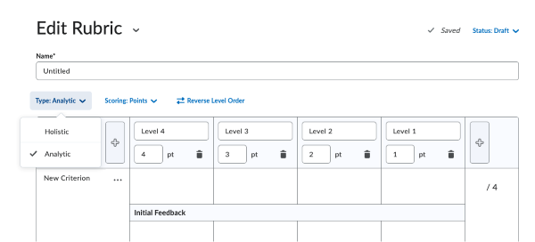
E. Begin populating your rubric with your assessment criteria by category
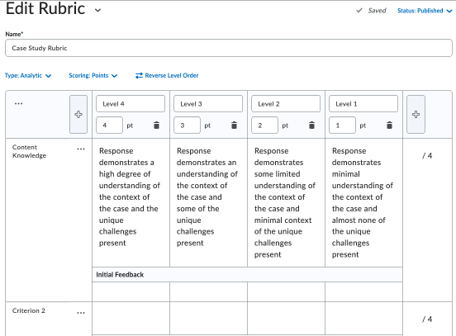
Once you have completed your rubric, it will automatically save, and you can close it.
2. Link Rubric to Assignment
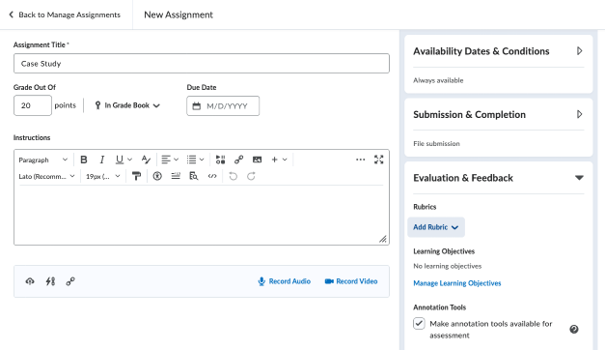
With your rubric, you can link this rubric with the assignment in Owl Brightspace to allow you to grade easier in the future. Ensure that your “Grade Out Of” score for this assignment is the same as the weight of the rubric in your course as this will make linking it easier later.
A. When creating (or editing your assignment), open the Evaluation & Feedback tab on the right and select “Add Rubric”
B. Select “Add Existing”
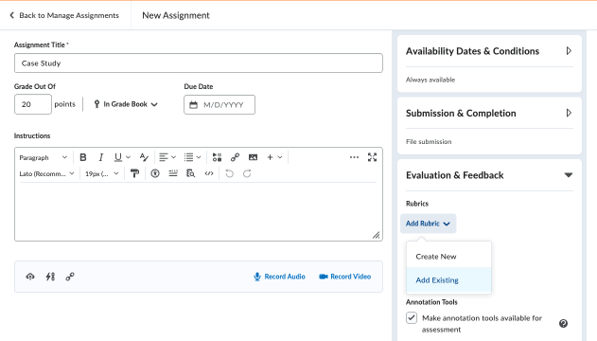
C. Select the rubric you would like to use
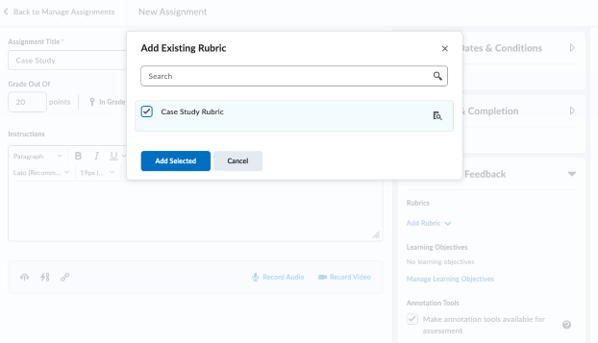
Once you have completed creating your assignment, you can save and close the assignment
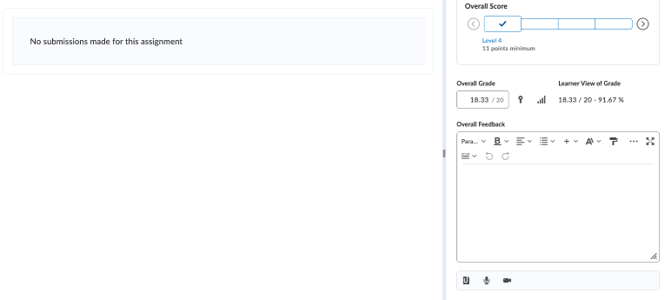
3. Grade with Rubric
Once students have submitted their assessments, you can use your created rubric to grade directly in Owl Brightspace.
A. For each criterion, select the appropriate level. The rubric comments will be available to students
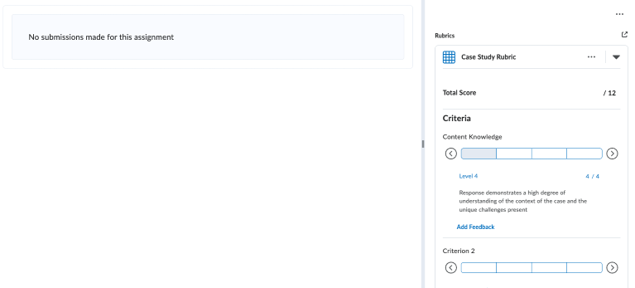
B. You can also add specific feedback on that rubric criterion to justify that specific mark by selecting “Add Feedback”
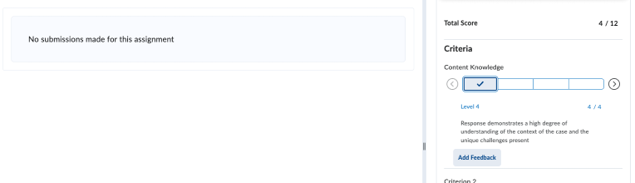
C. Enter your response in the “Criterion Feedback” box that appears
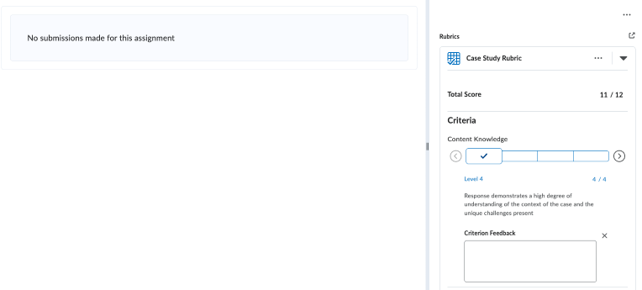
D. Once you give a grade for each rubric criterion, the score will auto populate at the bottom. If the total score of all rubric criterion is different from the weight of the assignment in your overall course, the rubric will automatically convert the rubric score to the appropriate score weighted for your assignment. You can also enter Overall Comments at the bottom of the rubric as you normally would for any assignment.
Reflective Prompts on Rubric Development and Use
Using reflective prompts can offer an opportunity to consider whether your values, goals, and teaching styles align with a rubric you have designed and invite consideration of workflows and sustainability.
- In what ways will my rubric make things clearer and more sustainable for myself and Graduate Teaching Assistants (GTAs)?
- In what ways will my rubric make things clearer and more sustainable for students?
- Does my rubric make room for flexibility or creativity in structure, content, or analysis for students? Why or why not?
- How (and when/where) will I introduce the rubric to students and GTAs?
- What questions do I anticipate GTAs or students will have? How will I respond?
- What is my plan to review, reflect on, and iterate my rubric(s) in the future?
Additional Resources
American Association of Colleges and Universities. Value Rubrics.
Brijmohan, A. Rethinking rubrics in the age of Generative AI. Robert Gillespie Academic Skills Centre, University of Toronto-Mississauga.
Center for Teaching Innovation. Using Rubrics. Cornell University.
Centre for Teaching and Learning. Develop Rubrics. Université Concordia.
Furman, W. (2024). Rubric design: A designer's perspective. Journal of the Scholarship of Teaching and Learning 24(4), pp. 221 – 237.
McGill University. Rubrics: The Basics. Teaching and Learning Knowledge Base.
North Carolina State University. Rubric best practices, examples, and templates. Teaching Resources.
Teaching and Learning Commons. Designing and Using Rubrics. Kwantlen Polytechnic University.