

Search Website
Additional Steps for Curriculum Mapping
The following page outlines the key steps involved in the curriculum mapping process for undergraduate programs, from initial consultation with the CTL Curriculum Team through course mapping and interpreting the curriculum maps for the IQAP self-study. It may be helpful to review the curriculum mapping overview and the example curriculum map before you get in touch.
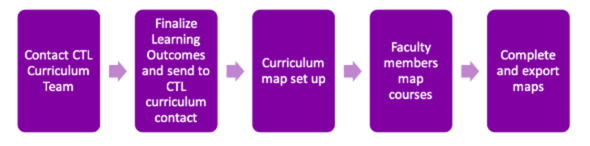
Contact us at curriculum@uwo.ca and let us know you would like help with curriculum mapping. We will connect you with one of our team members to be your key contact.
Finalize your program learning outcomes, add your courses and assigned instructors to a template Course List Excel Worksheet provided by the CTL, and send them both to your CTL curriculum team contact. The CTL team member will work with you to develop an efficient mapping approach that captures the variation in your modules while minimizing the amount of data entry required by your faculty members.
The CTL team member will set up the curriculum map with the outcomes included. In most cases, there will be one editable Data Entry sheet (where instructors input their data), with multiple output maps (one map for each module and four sets of graphs). These output maps are suitable for including in the self-study. Output maps and graphs include:
- Progression of Learning maps (one per mapped module)
- Summary of Assessment Methods Graph
- Summary of Instructional Methods Graph
- Assessment Categories by Course Level Graph
- Instructional Categories by Course Level Graph
The curriculum map is a collaborative document. Once set up, instructors can enter their own course data.
The chair or another faculty champion should input their course data before the map gets sent to the wider group of instructors as an example. Once this is done, the Program Chair sends out a link to the collaborative curriculum map with detailed Curriculum Mapping Instructions and a deadline to relevant instructors (see linked resources below).
Include in your email:
- Editable link to map - each program will have its own editable map (step 3 above).
- Curriculum Mapping Instructions - includes instructions for Progression of Learning maps and Assessment and Instructional Methods map.
- How to enter your course data into a curriculum map - (Optional viewing)
Suggested Email Language
“Dear colleagues,
One of the steps in writing our self-study for IQAP review is to create curriculum maps of our undergraduate program modules. We have worked with the Centre for Teaching and Learning to create a collaborative curriculum map so that we can each enter data about our own courses. The data we collect is only meaningful if we are using the same process and definitions. For this reason, I ask that you complete these tasks, in order, by (deadline).
- Read the Curriculum Mapping Instructions
- Watch "How to enter your course data into a curriculum map" (optional video – 6 minutes)
- Open the curriculum map [INCLUDE LINK]
- Find and enter data for the courses you are responsible for mapping on the Data Entry sheet. Check the "Assigned" column to see if there are additional courses you have been asked to map.
- Select "Done" to signal to us that the task is complete.
[Departmental curriculum champion name] has filled out their course data as an example. Please do not hesitate to ask [Departmental curriculum champion name] if you have clarifying questions.”
Tip: During mapping, make copies of the In Progress map. Remember that everyone can edit your Google Sheet, which means accidental edits can happen as well. We have not run into problems with this, but we have also been careful to ensure there is always a backup. We suggest periodically downloading an Excel copy of your Google Sheet over the period during which faculty members are entering their data. You can do this by clicking "File>Download> Microsoft Excel (.xlsx)".
The Program Chair should follow up with faculty whose course data is missing from the map at the deadline. Once the data entry is complete, they should let their CTL curriculum contact know. The CTL curriculum team will review the map, clean up any data entry issues, and format and finalize the charts and graphs. They will send the final map back to the Program Chair for review and approval. Once the maps are finished, the Program Chair adjusts the map outputs to fit on a printed page or publish them to the web and include links to the web version in the self-study.
How to export your maps for easy sharing
- Log into Google Sheets with a Google account
- Open the curriculum map
- Click File > Make a Copy > Name it [Program] Curriculum Map for Self-Study. This way, any changes you make to the curriculum map will not compromise your original copy.
- In the new copy of the curriculum map (which will open automatically), click File > Share > Publish to Web.
- In the dialogue box that opens, leave the default of "Entire Document" and "Web Page". Click Publish.
- Copy this link and paste it in a new window to view. This is also the link that you can use to hyperlink your changes. Your maps will be viewable with some noticeable differences.
a) The tabs to switch between sheets are now links at the top of the page.
b) The Google Sheets menus, including the ability to edit are missing. This means that a reviewer viewing your map cannot accidentally edit it. - Any changes you make to the new Google Sheet “[Program] Curriculum Map for Self-Study” will be reflected in the published web version, however you will need to refresh the browser for the changes to take effect. Consider the following to make your curriculum map easier to read and navigate:
a) Hide sheets that are not final versions of the maps, including: Data Entry, Methods A and I, and any others you think are extraneous.
b) Adjust column widths and font sizes for legibility.
Curriculum maps can be a great source of data for fostering discussions about the undergraduate curriculum. These conversations are important for continuous improvement, and they can help you respond to key sections of the self study. Consider scheduling a meeting or assigning groups to discuss and report back on observations about the curriculum map.
You can ask people to write responses to the self-study components directly or use the prompting questions; both sets of prompts are provided below.
Curriculum Mapping and the Self-Study
Self-Study Section 2.2.2.1 - Mapping the curriculum
What does the curriculum map reveal about the following?
- Alignment and integration of learning outcomes across courses
- Distribution of student workload
- Types of assessments of student work
- Gaps identified through curriculum mapping and possible future development of the curriculum
Self-Study Section 2.2.5 - Learning Outcomes
Describe the appropriateness and effectiveness of the mode(s) of delivery (e.g., classroom format, online, blended, community-engaged learning, problem-based, compressed part-time, multi-campus, inter-institutional) to facilitate students’ successful completion of the program-level learning outcomes.
Self-Study Section 2.4 - Assessment of Teaching and Learning
Comment on the appropriateness and effectiveness of the methods for assessing student achievement of the program-level learning outcomes and the Western Degree Outcomes.
Additional Self-Study Questions
- How does the curriculum address the current state of the discipline?
- Describe special and unique features of the program.
Questions for Reviewing Curriculum Maps
Progression of Learning Maps
- What trends do you see?
- Where do you see gaps? Are these real gaps (e.g., students never reach proficiency in an outcome) or are they suitable considering the outcome (e.g., a few core courses are all that are needed for this outcome)?
- Where do you see redundancies? Are these necessary redundancies or unnecessary repetition?
Assessment and Instructional Methods Summary graphs
- How do the types and variety of assessments/ instructional activities align with program values and learning outcomes?
Category of Assessment and Instructional Methods by Course Level
- Do instructional methods used throughout the program align with the outcomes and values of the program? Are there opportunities to introduce signature instructional methods earlier in the program?
- Are assessments required of students in 4000 level courses scaffolded throughout the program (introduced in earlier courses)?