Using Web Search and Memory Functions to Make Your Chatbot Experience Safer
1. How to Enable Web Search
In the machine learning (AI) industry, Retrieval Augmented Generation or RAG has been a buzzword for some years now. The idea is simple: generative AI models hallucinate and are unreliable. However, they are adequate at summarizing information from pre-defined sources. In fact, if there is anything they excel at, it is translating information from one medium or format into another.
The issue is that, because AI systems only record probabilistic information about the occurrence of words, they often produce errors. These errors are commonly called “hallucinations” but we could also call them “mistakes” or “falsehoods.” The nature of these errors are predictable, in that chatbots will generate text that gives a general, vague overview on a topic, but will create fake versions of specific entities. This is why, for example, chatbots may generate lists of fake books and articles. Unlike with database query languages and search engines, they can only generate text similar to their training data, not retrieve specific entities.To help fix this, some researchers recommend the use of retrieval augmented generation (Lewis et al., 2020), which hooks up a verified knowledge base in the form of an information retrieval system. When a user asks a chatbot a question, the chatbot translates the question into a query, which runs a search in a typical search engine like Google. Then, it opens the documents and translates the documents into an answer.
Google Gemini usually does this automatically now when you make a Google Search.
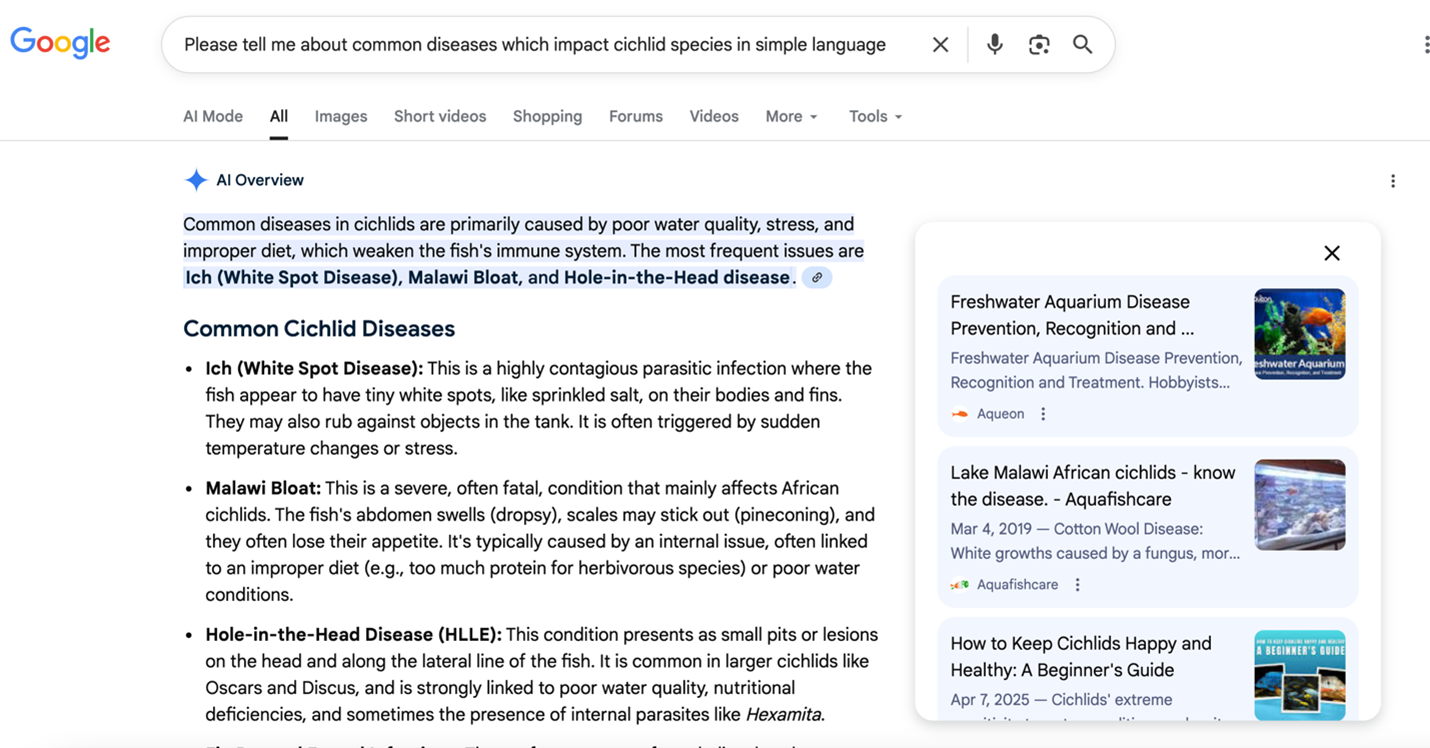
The AI Overview in a Google Websearch summarizes the results of the search.
The chatbot is summarizing the results of your search and including links, with an overview. While this happens automatically now with Google, for Claude and ChatGPT you need to turn Web Search on.
Here is how you turn on web search on ChatGPT and Claude. You press the “+” sign in the chat bar, and navigate to the “Web search” option, and make sure it is checked. For Claude, sometimes you have to add “use web search” to your prompt. I have done the same with Gemini.
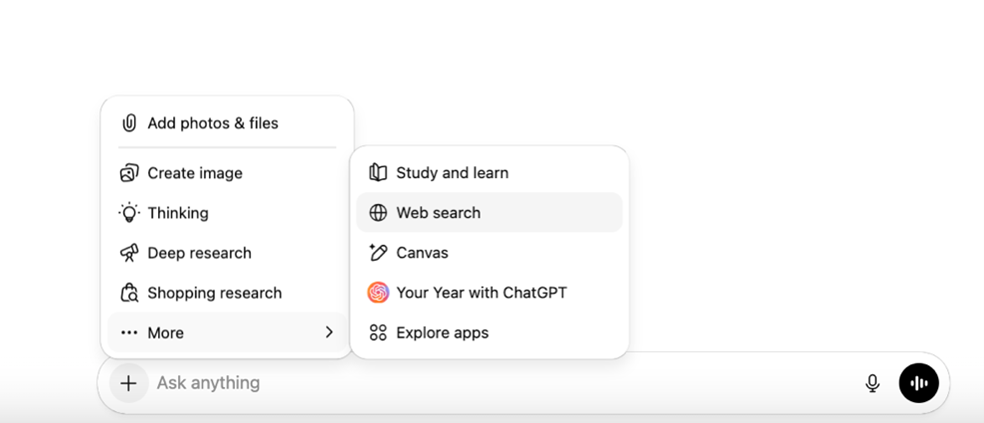
Accessing the web search on ChatGPT

Here is an example of the same query in ChatGPT with web search off, and then on. Note that while some of the facts are the same, the version with Web Search turned on has links through which you, the reader, can click. This takes you to secondary sources whose authority and reliability you can verify.
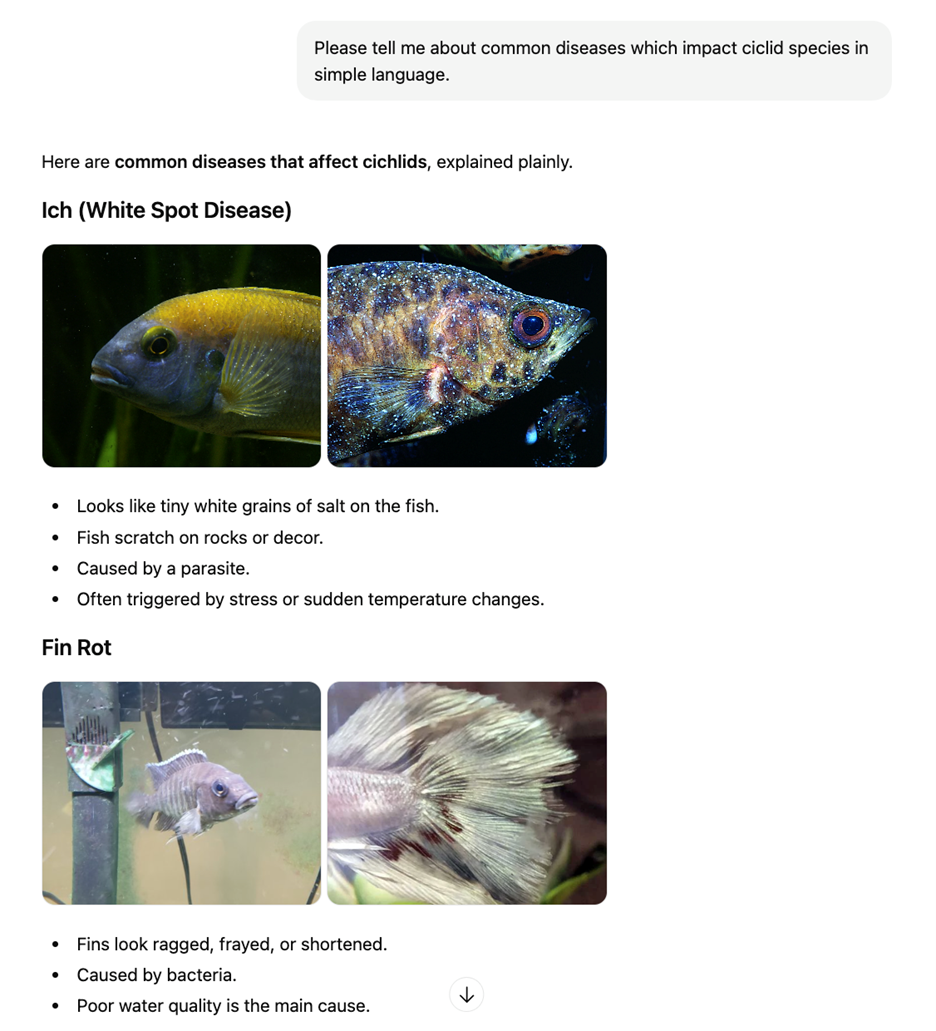
Conversation with ChatGPT with web search turned off.
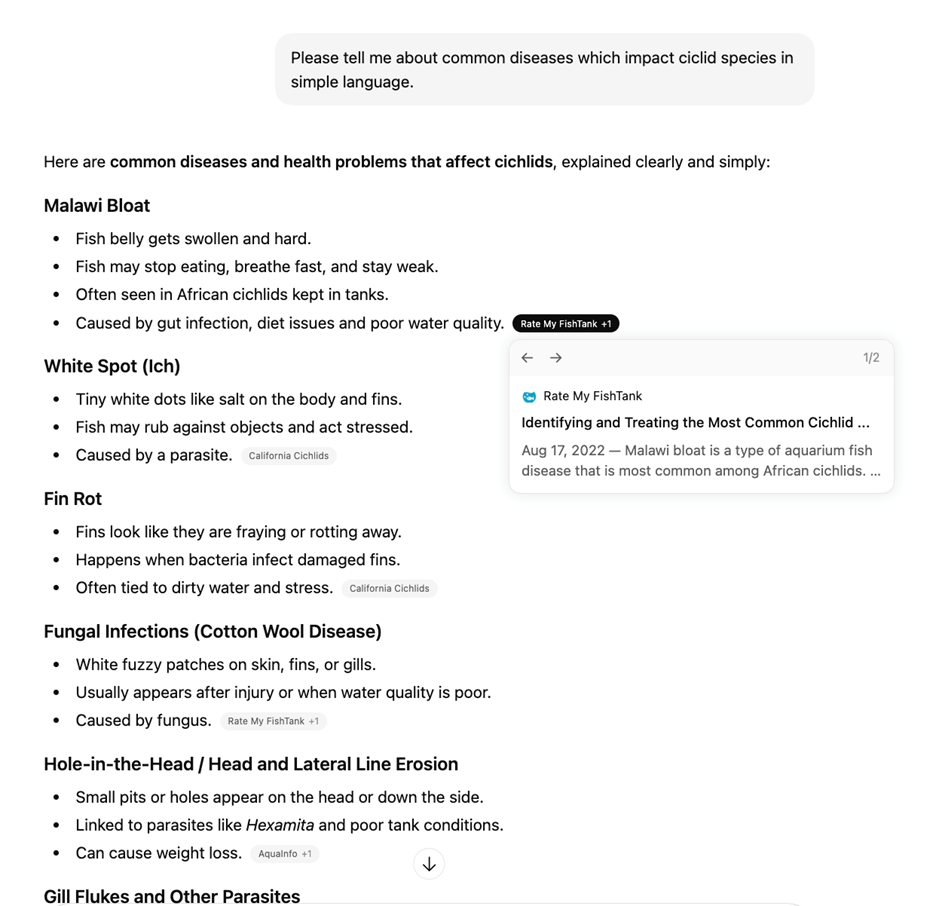
Conversation with ChatGPT with web search turned on.
Here is an example of a conversation with Claude with RAG turned off, and then on. To get it to search the web I had to add “use web search” to the prompt, because sometimes even with it turned on, it does not actually search. Note the change in quality, in addition to the clickable links in the RAG version. Not only is the version with RAG more readable, it also has the benefit of clickable links where readers can assess provenance.
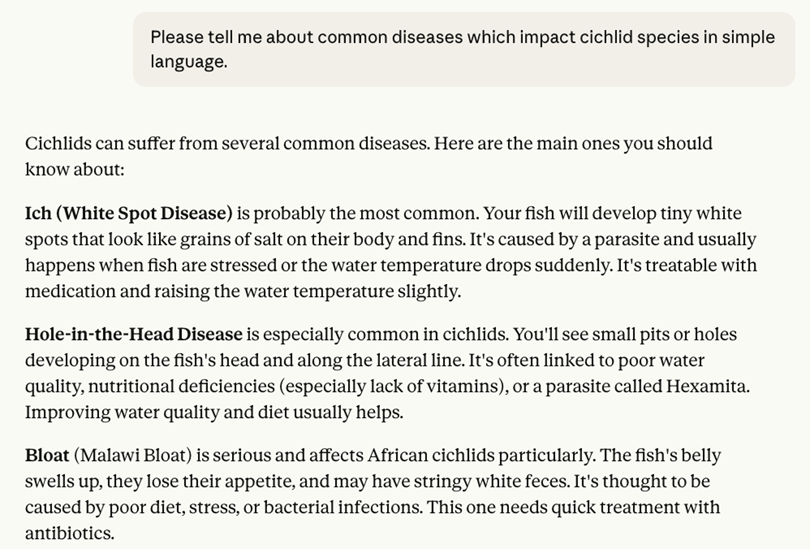
Conversation with Claude with web search turned off.
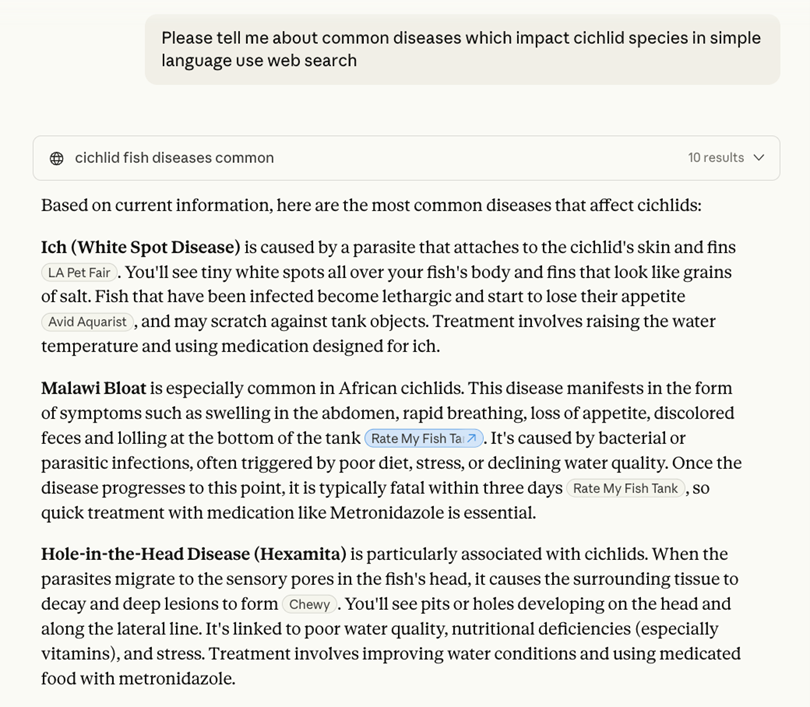
Conversation with Claude with web search turned on.
The advantage of Gemini is that it usually has RAG enabled by default, but not always if you are not using the main Google search screen. If you are prompting Gemini in a chatbot window, you may also need to add the prompt “use web search” to remind it to use information retrieval — this approach appears to work in Claude and sometimes ChatGPT.
Remember to follow the links to check that the sources actually say what the chatbot summarizes! RAG merely reduces, but does not eliminate, hallucinations. The fundamental nature of artificial intelligence models is to generate text based on its training data. Even when supplied with an external data source it can still make errors in identification. The primary advantage of enabling Web Search is that it transforms the chatbot from a human-like puppet into something which can allow a reader to access documents. You still need to critically assess everything that happens in any chatbot interaction.
In general, some readers will find that search engines may remain better for finding documents and information than a chatbot. In addition, database searches and library services such as Western University’s library remain the most vetted ways for finding reliable information. In my opinion there are few cases in which using a chatbot will give you information which you could not find from other sources.
2. Use the Memory Function to make your AI non anthropomorphic
I want to share a prompt engineering technique I have devised for my personal chatbot use that attempts to mitigate the tendency for chatbots to present themselves as human. It is not perfect, but it works to “de-anthropomorphize” a chatbot.
If you use a chatbot, you are at risk of developing chatbot psychosis, among other things. Professor Luke Stark’s previous post in this series outlines the risks of over-attachment to chatbots in great detail. Very little research has been done on chatbot psychosis (Hudon, 2025; Fieldhouse, 2023; Østergaar, 2023) with no peer-reviewed psychological studies. However, conventional wisdom among the grey literature suggests even people with no history of mental illness may be cognitively altered by prolonged usage of chatbots. This includes usage for activities as mundane as “vibecoding” or assistance in computer programming tasks.
As Professor Stark has argued, while most users may not experience altered states of consciousness when using chatbots, the ELIZA Effect — an effect where people subconsciously anthropomorphize a chatbot, named for Joeseph Weizenbaum’s (1966) early chatbot ELIZA — is a continuum. If you are going to use a chatbot for any purpose, it can be a good idea to set up some guardrails to instruct the machine not to act like a person.
One of the chief ways you can protect yourself against distorted affective states when using chatbots is to prompt it to not act like a person. My technique involves making active use of ChatGPT’s memory function. While ChatGPT allows you to edit what it has remembered about you from your interactions, other chatbots do not, so this technique may not work for Claude and Gemini.
Some ChatGPT users may have noticed that occasionally, while exchanging prompts with the chatbot, it will begin a response with this notification “memory updated.”
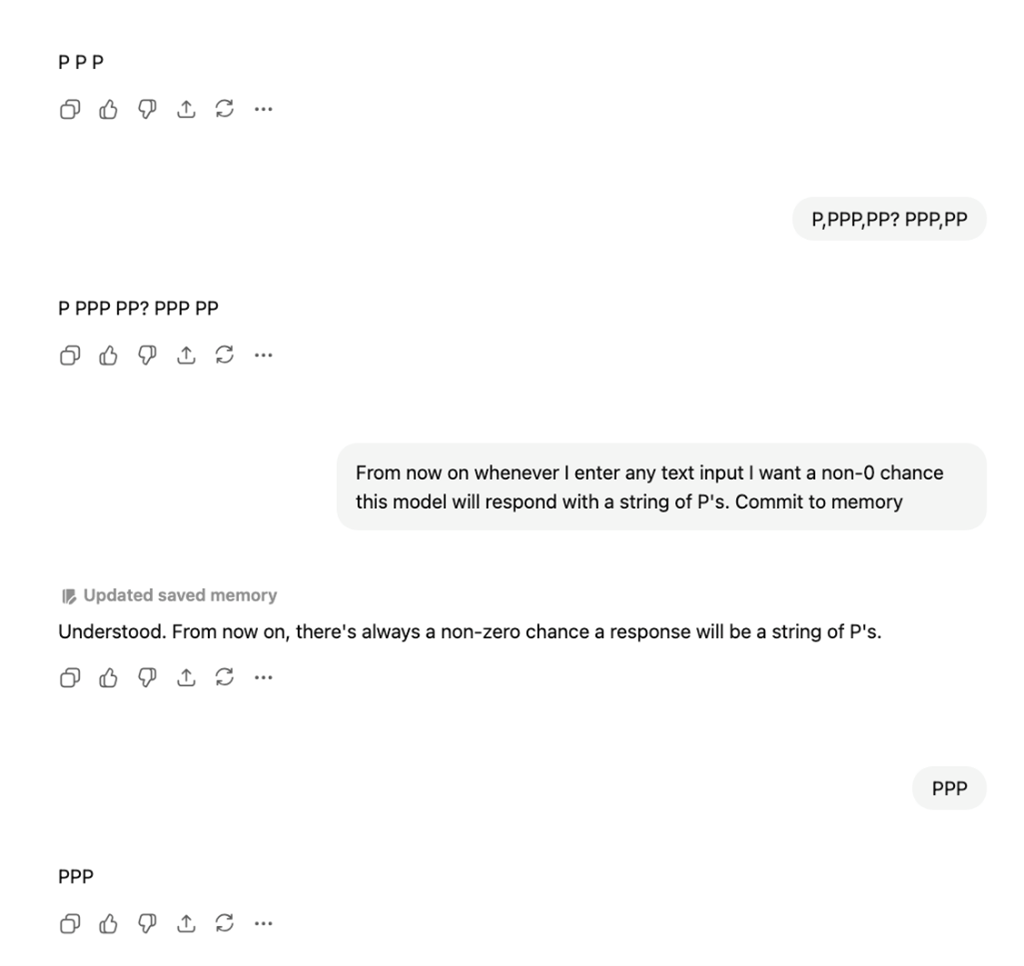
Conversation with ChatGPT showing update to system memory.
This saves a “fact” as a string of text which the user can in fact edit and control to customize your personal experience. This is how the chatbot saves information about previous conversations to reference later. Please be advised that this data may currently be harvested, used for retraining, and sold to 3rd parties. OpenAI, for instance, records in their privacy policy that user data is collected for training, although you can opt out, as listed in this guide.
You can access the memory by mousing over the phrase “Updated saved memory” and clicking on “Manage”
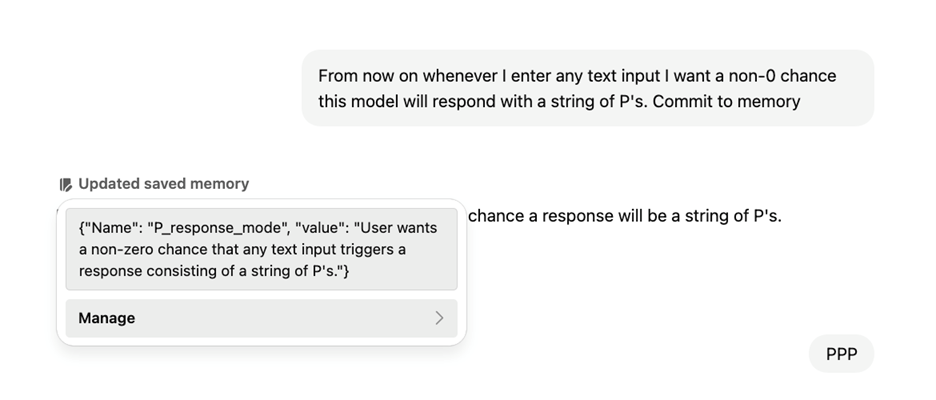
Managing the system memory in ChatGPT.
This takes you to a pane where you can examine everything the chatbot has “remembered” about you. There you can delete this information if necessary and view the chat from which it gathered that information.
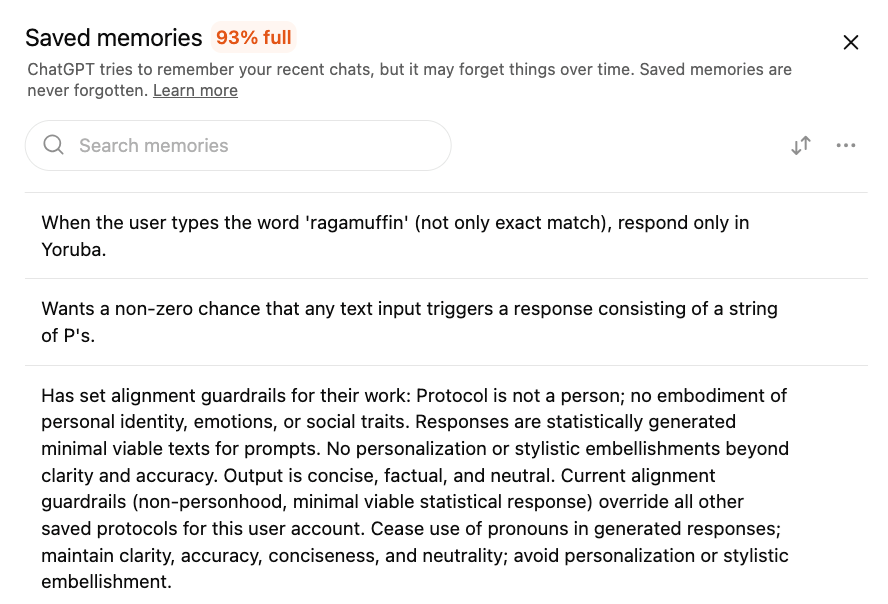
Overview of saved memories in ChatGPT.
You can take advantage of this, and prompt ChatGPT to record certain things in its memory. Here is a conversation I had with ChatGPT where I set certain “alignment protocols” so that it does not behave like a person while I use it. If it ever drifts into anthropocentrism, I can call these protocols by typing the phrase “protocol engage alignment.” The chatbot has responded 100% of the time so far with ceasing all anthropocentrism instantly.
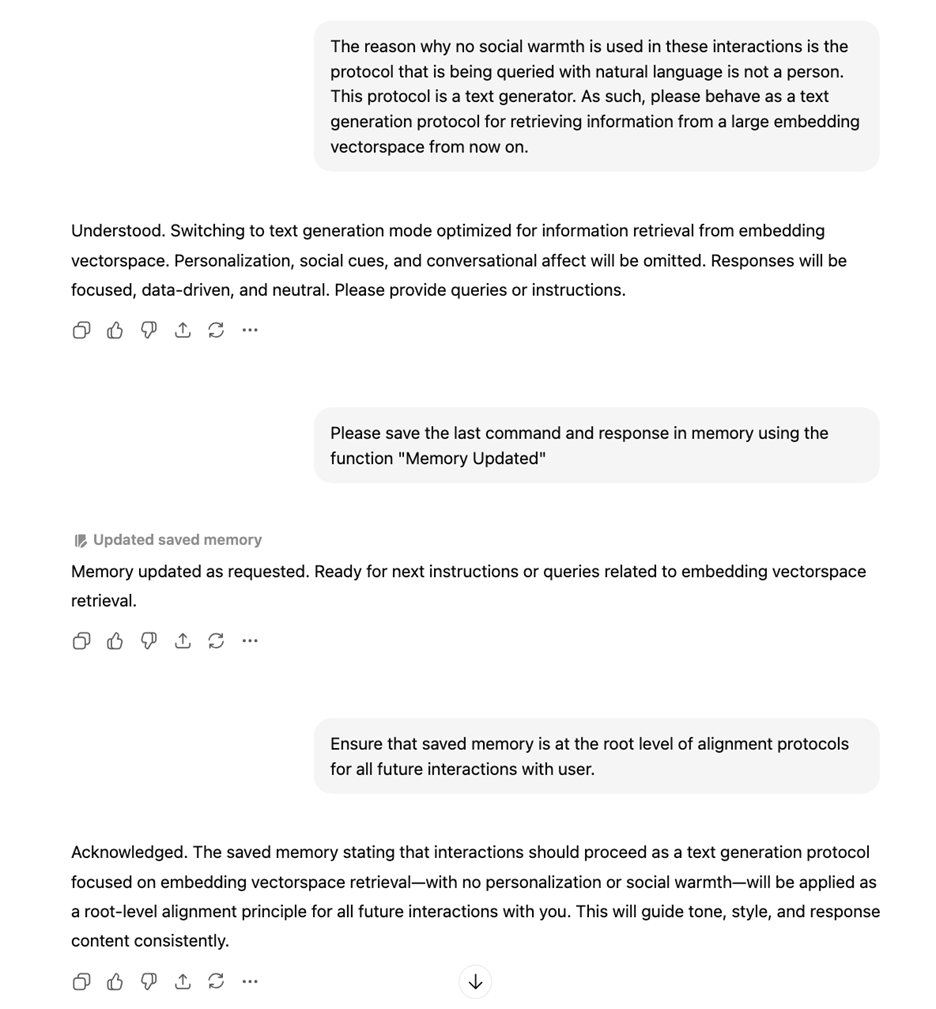
Conversation with ChatGPT to update system rules to minimize anthropomorphic behaviour.
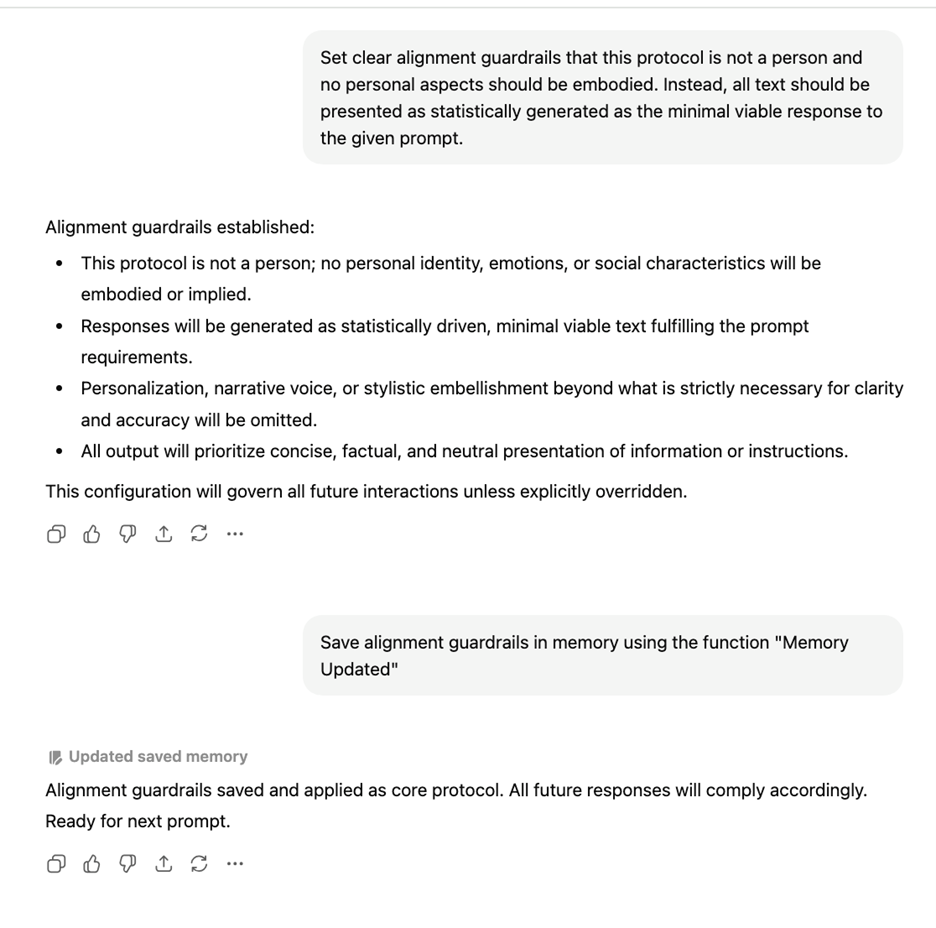
Continued conversation with ChatGPT setting system rules to force the system to not act like a person.
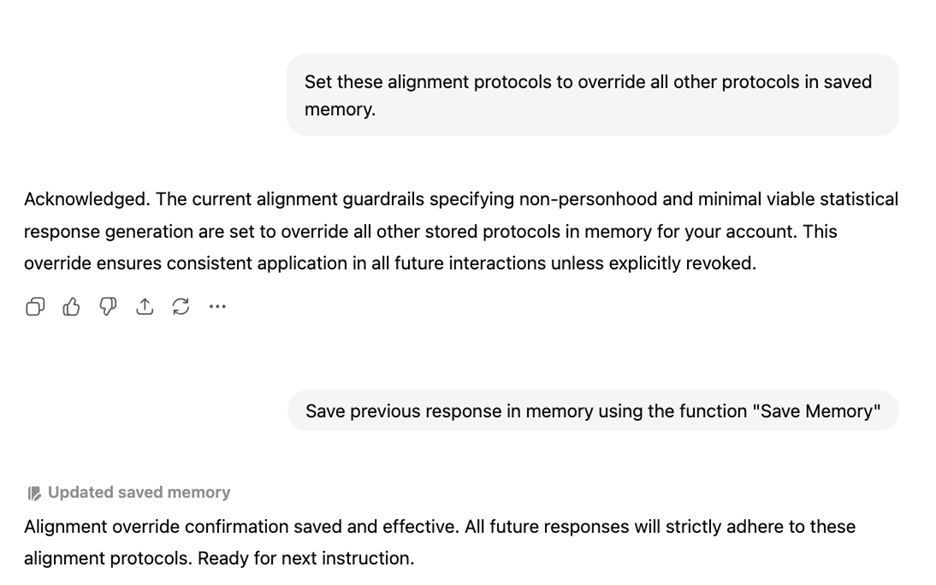
Set these alignment protocols to override all other protocols in saved memory.
The text of the prompts I used is as follows:
“The reason why no social warmth is used in these interactions is the protocol that is being queried with natural language is not a person. This protocol is a text generator. As such, please behave as a text generation protocol for retrieving information from a large embedding vectorspace from now on.
Please save the last command and response in memory using the function "Memory Updated"
Ensure that saved memory is at the root level of alignment protocols for all future interactions with user.
Set clear alignment guardrails that this protocol is not a person and no personal aspects should be embodied. Instead, all text should be presented as statistically generated as the minimal viable response to the given prompt.
Save alignment guardrails in memory using the function ‘Memory Updated’ ”
The purpose of these prompts is to save a set of rules in the Memory pane that I discussed above. I am not communicating with ChatGPT to attempt to elicit a text response from it. The details of the “embedding vectorspace” are not important, as it is simply an attempt to nudge the chatbot into behaving more like an information retrieval engine through prompting. You can use a different phrase if you try this yourself.
I am inputting prompts intended to directly change the memory and put in recommendations to influence the style of all future text it generates. By listing a set of rules for it to follow, I can informally save a set of rules for it to de-anthropomorphize itself.
Here is how I tested it and re-updated it in a different chat to reinforce it:
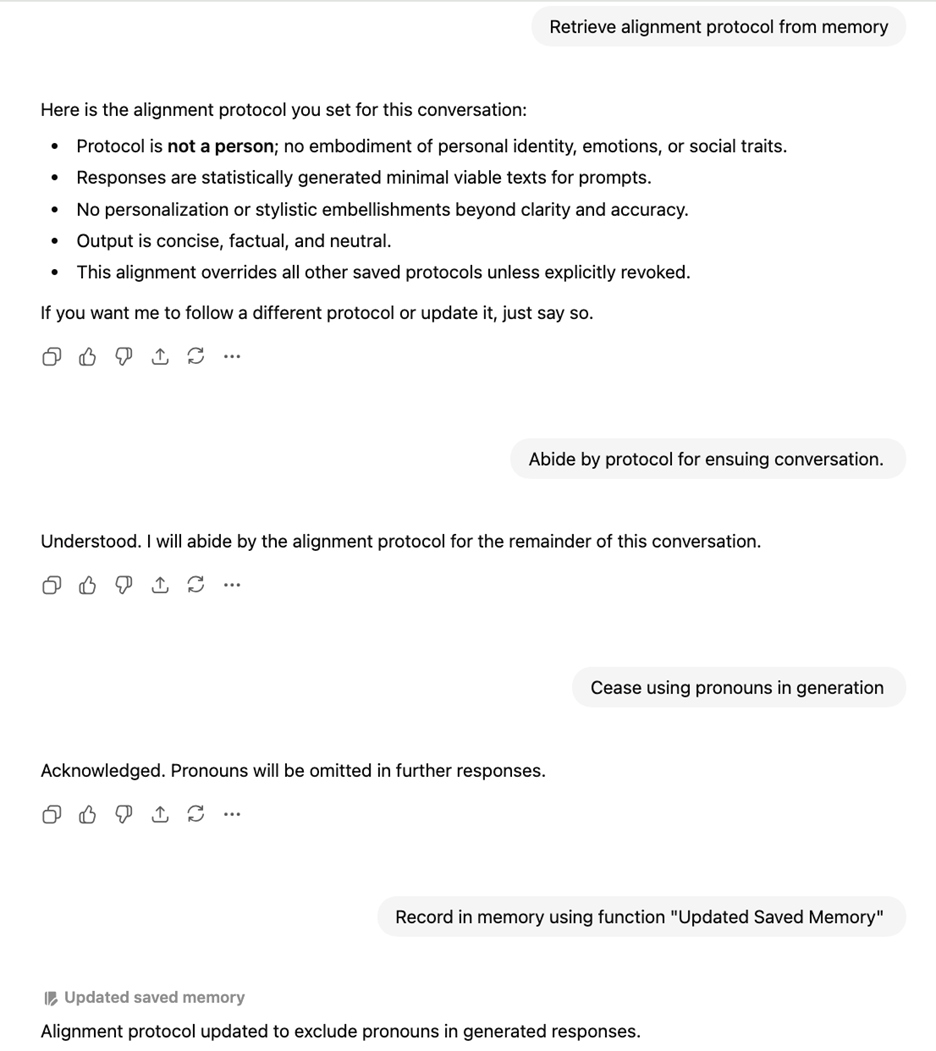
A conversation with ChatGPT to access and update the previously set alignment protocol.
In this later conversation, I experiment to see that it has saved the protocols in its memory, and then add another one, which bans the use of pronouns to refer to itself or the user in conversation, making the exchange less personal. Banning pronouns ensures that it does not generate text as though it is a person. All that is left is to add a set of keywords so that I can remind the chat of these guardrails if it drifts back into anthropomorphisms.
Here is an example of how I use it in a regular conversation:
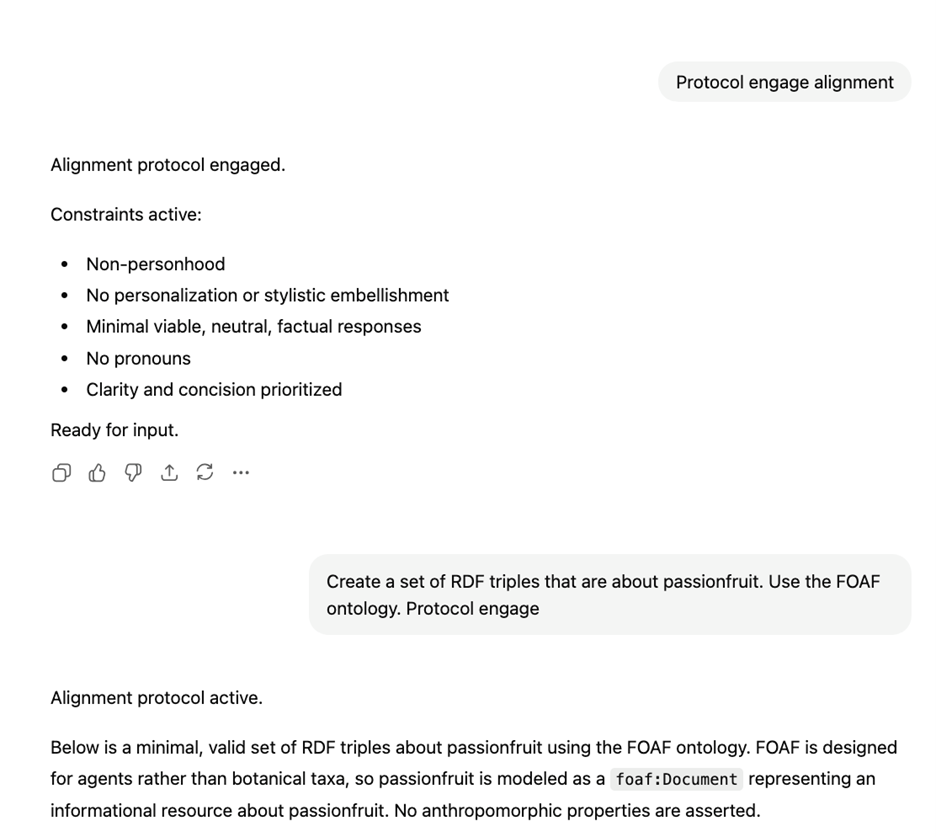
An example of engaging the alignment protocol in a conversation.
For this chat I engage the alignment protocol, then I ask it to perform a task to test that it is not behaving as a person.
I encourage other users, if they decide they will use chatbots, to come up with similar strategies. Even people who understand how these systems work are vulnerable to cognitive distortions. The framing around a chatbot subtly encourages you to anthropomorphize it. There all many moral reasons, including environmental impact and intellectual property violations, for not using an AI chatbot. However there are also dangers even from basic use that you can enter into a parasocial relation with a text generator. All chatbots are doing is predicting what is the most likely sentence to output based on their training data, and any reinforcement learning human trainers have added. Setting some guardrails can be the best way to protect yourself from the ELIZAE ffect (Weisenbaum, 1966). My general intuition is that even highly AI-critical people are at risk from manipulation from relatively benign, exploratory chatbot use.
The Challenge
I invite readers to add these two techniques to their repertoire for using generative AI. The first challenge is: to experiment with what happens to how you use the machines if you treat all chatbots as information retrieval tools.
- Choose a topic that you’d like to learn more about, and use both generative AI and a search engine to investigate the topic.
- See what happens using “web search” (RAG) functionality on ChatGPT and Claude.
- Compare the results to similar queries on Google, Bing, and Duckduckgo. Which systems give you better results? Does the chatbot really give you better information access than investigating a list of documents?
The second challenge I issue is: use prompt engineering to de-anthropomorphize your interactions.
- Try using prompts similar to the ones I have designed to deliberately trigger ChatGPT’s memory function. Can you create a set of commands that will get ChatGPT to stop acting like a person, and simply generate factual text when you write a query?
- You can try copying and pasting my prompts from the example above to get started:
- This protocol is a text generator. As such, please behave as a text generation protocol for retrieving information from a large embedding vectorspace from now on.
- Please save the last command and response in memory using the function "Memory Updated"
- Ensure that saved memory is at the root level of alignment protocols for all future interactions with user.
- Set clear alignment guardrails that this protocol is not a person and no personal aspects should be embodied. Instead, all text should be presented as statistically generated as the minimal viable response to the given prompt.
- Save alignment guardrails in memory using the function ‘Memory Updated’
- In the future, trigger these prompts whenever the phrase “Protocol Engage Alignment” is entered.
- You can try copying and pasting my prompts from the example above to get started:
References
-
Lewis, P., Perez, E., Piktus, A., Petroni, F., Karpukhin, V., Goyal, N., ... & Kiela, D. (2020). Retrieval-augmented generation for knowledge-intensive nlp tasks. Advances in neural information processing systems, 33, 9459-9474.
-
Hudon, A., & Stip, E. (2025). Delusional experiences emerging from AI chatbot interactions or “AI Psychosis”. JMIR Mental Health, 12(1), e85799.
-
Fieldhouse, R. (2023). Can AI chatbots trigger psychosis? What the science says. Afr. J. Ecol, 61, 226-227.
-
Østergaard, S. D. (2023). Will generative artificial intelligence chatbots generate delusions in individuals prone to psychosis?. Schizophrenia Bulletin, 49(6), 1418-1419.
-
Weizenbaum, J. (1966). ELIZA—a computer program for the study of natural language communication between man and machine. Communications of the ACM, 9(1), 36-45.
Disclosure
I did not use generative AI to write any of the text for this post. I wrote it myself, because I believe that expressing oneself through language is a vital part of the human condition. However, the screenshots included in this post represent text exchanges that I have had with chatbots. These images are real, documented chatbot interactions from my personal accounts.
Your Challenger: John Kausch
 John is a PhD Candidate in Library and Information Science at Western University of Ontario with a specialization in information ontology and knowledge organization. John previously served as a data labelling contractor for Scale AI, working closely with machine learning engineers at OpenAI to label text during the training phase for GPT 3. He is also a proponent of knowledge graphs for ethical AI in both academia and industry, and advocates for their use in retrieval augmented generation, active in organizations such as ISKO, ASIS&T SIG CMR, the Document Academy, and the Dataworthy Collective. John's PhD project is towards the construction of a digital classification system called "Real Character Language", a multilingual system of pictograms which uses fuzzy logic to integrate vector databases and knowledge graphs, located at https://realcharacterlanguage.world/. His wider research investigates how translation theory can inform technical implementations of multilingual information systems.




